
In a microservices architecture, applications are split into multiple independent services. For example, an e-commerce application may consist of the following services:
- Order Service
- Payment Service
- Inventory Service
- Notification Service
These services frequently communicate with each other.
For example:
                Client
                   |
                   |
             Order Service
              /         \
             /           \
 Payment Service    Inventory Service
Whenever the Order Service wants to process a payment, it needs to communicate with the Payment Service.
The first question is:
How does the Order Service locate the Payment Service?
Should it use an IP address and port, or is there a better solution?
The Traditional Approach
Suppose the Payment Service is running inside a Docker container.
Payment Service

IP Address : 172.18.0.5
Port       : 8080
The Order Service calls it using the IP address.
payment.url=http://172.18.0.5:8080or
restTemplate.getForObject(
    "http://172.18.0.5:8080/payment",
    String.class
);
Initially everything works perfectly.
The Problem
Suppose the Payment Service becomes unhealthy.
The container is removed and recreated.
Old Container

172.18.0.5

        ↓

New Container

172.18.0.8
The Order Service still calls
172.18.0.5The request fails.
Now someone has to update
payment.url=http://172.18.0.8:8080This is clearly not a scalable solution.
Scaling Makes the Problem Worse
Initially there is one Payment Service.
Payment Service

172.18.0.5
Later traffic increases.
Now there are three instances.
Payment Service 1

172.18.0.5

----------------

Payment Service 2

172.18.0.8

----------------

Payment Service 3

172.18.0.10
Now which IP should Order Service call?
Should it call
172.18.0.5or
172.18.0.8or
172.18.0.10Without service discovery, the Order Service has to maintain all these IP addresses and implement its own failover and load-balancing logic.
Problems with Hardcoded IP Addresses
Hardcoding IP addresses introduces several challenges:
- Container IP addresses change when containers are recreated.
- New service instances require configuration updates.
- Removing service instances also requires configuration updates.
- Clients must manage multiple IP addresses.
- Clients need to implement health checking.
- Clients need to implement load balancing.
- Maintaining configurations becomes increasingly difficult as the number of services grows.
Clearly, this approach is not sustainable.
The Solution: Service Discovery
Instead of using IP addresses, services communicate using logical service names.
A Service Registry keeps track of all running service instances.
Services register themselves when they start.
Clients simply ask the registry for the location of a service.
Netflix Eureka
One of the most popular service discovery solutions in the Spring ecosystem is Netflix Eureka.
The architecture looks like this:
              +---------------------+
              |    Eureka Server    |
              +---------------------+
                    ▲          ▲
                    │          │
          Register  │          │ Register
                    │          │
        Payment Service 1   Payment Service 2
Every service registers itself with Eureka.
Service Registration
Suppose we have three Payment Service instances.
Payment Service 1

10.0.0.11

↓

Registers

PAYMENT-SERVICE
Then
Payment Service 2

10.0.0.12

↓

Registers

PAYMENT-SERVICE
Then
Payment Service 3

10.0.0.13

↓

Registers

PAYMENT-SERVICE
Eureka stores:
PAYMENT-SERVICE

10.0.0.11

10.0.0.12

10.0.0.13
Calling a Service Using Eureka
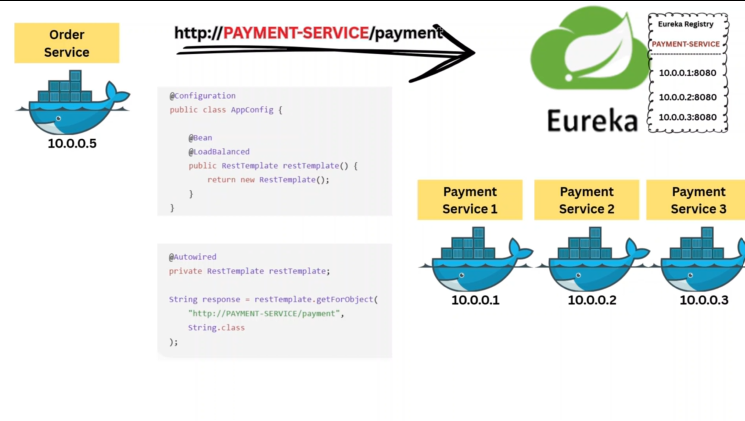
Instead of calling
http://10.0.0.11:8080/paymentthe client simply calls
http://PAYMENT-SERVICE/paymentTo enable this with RestTemplate, define it as:
@Bean
@LoadBalanced
public RestTemplate restTemplate() {
    return new RestTemplate();
}
The @LoadBalanced annotation enables the RestTemplate to resolve logical service names registered with Eureka.
Without @LoadBalanced, you must use an IP address or hostname.
With @LoadBalanced, you can simply use the logical service name.
How the Request Flows
Order Service
       |
       |
http://PAYMENT-SERVICE/payment
       |
       |
    Eureka
       |
       |
Returns healthy Payment Service instances
       |
       |
Chooses one instance
       |
       |
Payment Service
If only one Payment Service instance exists, that instance is used.
If multiple instances exist, one healthy instance is selected.
Architecture Evolves
As applications evolved, organizations started deploying microservices on Kubernetes.
Now the question becomes:
Do we still need Eureka?
The answer is
No.
Kubernetes already provides built-in service discovery.
Understanding Pods
Before understanding Kubernetes service discovery, let’s first understand Pods.
Applications do not run directly as containers.
Instead, they run inside Pods, which are the smallest deployable units in Kubernetes.
Each Pod has
- A unique Pod name
- A unique internal IP address
- One or more labels
Example:
Pod Name

payment-7f96fbc8f9-kjh2m

Pod IP

10.244.1.5

Label

app=payment
The Pod IP is used only inside the Kubernetes cluster.
If the Pod is deleted and recreated,
Old Pod

10.244.1.5

↓

New Pod

10.244.3.9
the IP changes.
However, the label remains the same.
app=paymentLabels are extremely important because Kubernetes uses them to identify related Pods.
Deployment
A Deployment creates Pods.
apiVersion: apps/v1
kind: Deployment

metadata:
  name: payment-deployment

spec:
  replicas: 3

  selector:
    matchLabels:
      app: payment

  template:
    metadata:
      labels:
        app: payment

    spec:
      containers:
      - name: payment
        image: payment-service:1.0
replicas: 3means Kubernetes should always keep three running Pods.
If one Pod dies,
Kubernetes automatically creates another one.
Kubernetes Service
Now create a Service.
apiVersion: v1
kind: Service

metadata:
  name: payment-service

spec:

  selector:
    app: payment

  ports:
  - port: 80
    targetPort: 8080
Notice
selector:
  app: payment
The Service searches for every Pod having
app=paymentThose Pods become the Service endpoints.
payment-service

↓

10.244.1.5

10.244.2.7

10.244.3.9
If a Pod is recreated,
10.244.2.7

↓

10.244.5.11
Kubernetes automatically updates the Service endpoints.
No manual configuration is required.
Service Discovery in Kubernetes
Suppose all Payment Pods are running inside the same namespace.
A namespace is simply a logical grouping of Kubernetes resources such as Pods and Services.
Now the Order Pod wants to communicate with the Payment Service.
Instead of calling a Pod directly,
10.244.1.5or
10.244.5.11the Order Pod simply calls
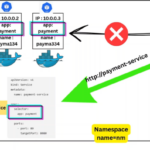
http://payment-serviceKubernetes resolves the Service name and forwards the request to one of the healthy Payment Pods.
The Service also performs built-in load balancing by distributing requests across the available healthy Pods.
Same Namespace vs Different Namespace
If both services are in the same namespace,
http://payment-serviceis sufficient.
If they are in different namespaces,
http://payment-service.<namespace>can be used.
The fully qualified service name is
payment-service.<namespace>.svc.cluster.localalthough the shorter form is usually sufficient inside the cluster.
Eureka vs Kubernetes
| Eureka | Kubernetes |
|---|---|
| Separate service registry | Built-in service discovery |
| Services register themselves | Pods are discovered automatically |
| Uses logical service names | Uses Service names |
| Maintains service registry | Uses Services, labels, and DNS |
| Requires Eureka Server | No additional server required |
Conclusion
Service discovery eliminates the need to hardcode IP addresses.
In a traditional Spring Boot microservices architecture, Netflix Eureka provides service registration and discovery.
In Kubernetes, service discovery is built into the platform through Services, labels, and DNS, making Eureka unnecessary in most Kubernetes deployments.
Applications simply communicate using stable service names, while Kubernetes automatically manages Pod discovery, health, and load balancing behind the scenes.