Retrieval-Augmented Generation (RAG): Architecture, Pipeline, and Enterprise Implementation

Introduction
Large Language Models (LLMs) such as GPT, Claude, Gemini, and Llama have transformed how organizations build AI-powered applications. These models excel at understanding language, reasoning, and generating human-like responses. However, they have a significant limitation: they do not automatically know an organization’s private, proprietary, or constantly changing information.
For example, an employee may ask:
“What is our company’s travel reimbursement policy?”
Although the LLM has extensive general knowledge, it has not been trained on your organization’s internal documents, SharePoint sites, Confluence pages, contracts, HR policies, or knowledge bases. Retraining a model every time a document changes is expensive, time-consuming, and impractical.
This is where Retrieval-Augmented Generation (RAG) becomes essential.
RAG enables AI systems to retrieve relevant information from enterprise knowledge sources at runtime and use that information to generate accurate, grounded responses without retraining the model.
The Problem RAG Solves
Consider an AI HR Assistant.
A user asks:
“How many vacation days do employees receive?”
Without access to company documentation, the AI may:
- Respond that it does not know.
- Provide a generic answer.
- Hallucinate an incorrect response.
The root problem is that the LLM lacks access to enterprise knowledge.
LLM Knowledge

✓ Public Information
✓ General Knowledge
✓ Training Data

✗ Company Policies
✗ Internal Documents
✗ Latest Updates
✗ Private Knowledge Bases
Organizations need a way to combine the reasoning capabilities of an LLM with their own knowledge repositories.
RAG provides that capability.
What is RAG?
Retrieval-Augmented Generation consists of three key stages:
Retrieval
Find relevant information from external knowledge sources.
Augmentation
Inject the retrieved information into the prompt.
Generation
Use the LLM to generate a response based on the retrieved context.
In simple terms:
Instead of expecting the LLM to know everything, RAG allows it to look up information before answering.
RAG in an Agentic Architecture
Modern AI agents are more than just language models. They are orchestration systems that coordinate multiple capabilities.
                User
                  │
                  ▼
             AI Agent
      ┌─────────┼─────────┐
      │         │         │
   Planner    Memory    Tools
      │
      ├──────────────┐
      │              │
     RAG            LLM
Each component has a specific responsibility:
Planner
Breaks down tasks into executable steps.
Memory
Stores conversation history and user preferences.
Tools
Connects to external systems such as Outlook, Jira, databases, APIs, and MCP servers.
RAG
Retrieves relevant enterprise knowledge.
LLM
Performs reasoning and generates responses.
In this architecture, RAG acts as the knowledge retrieval layer that supplies the LLM with relevant business information.
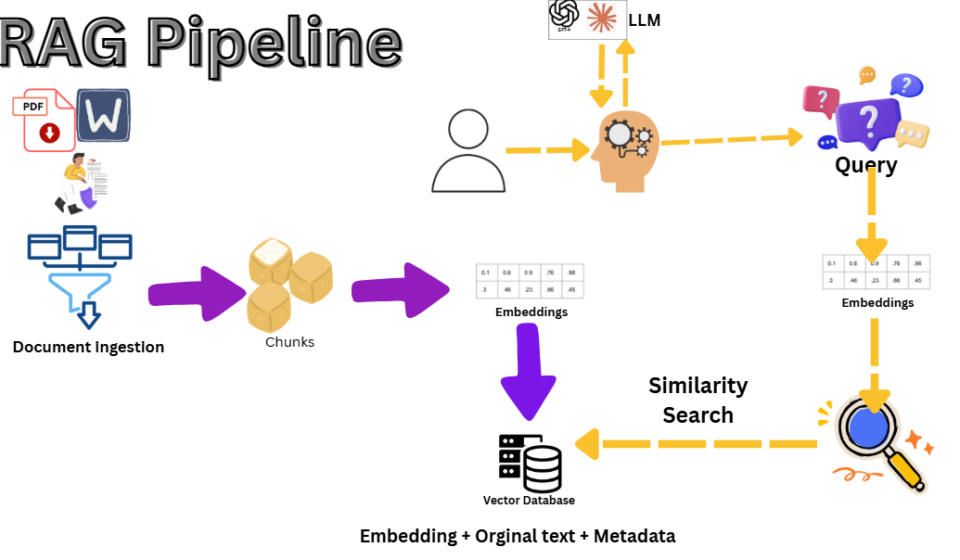
The RAG Pipeline
A production RAG system typically consists of two separate pipelines:
- Indexing Pipeline (Document Processing)
- Query Pipeline (Question Answering)
Part 1: Indexing Pipeline
The indexing pipeline prepares enterprise knowledge for retrieval.
Step 1: Document Ingestion
Documents are collected from various enterprise sources:
- SharePoint
- Confluence
- Google Drive
- OneDrive
- Azure Blob Storage
- Amazon S3
- Databases
- Internal file shares
- Websites
The ingestion service scans these sources and identifies new or updated content.
Step 2: Text Extraction
Documents come in many formats:
- DOCX
- HTML
- CSV
- Images
- Scanned documents
The system extracts text while preserving structure and metadata.
Step 3: Metadata Extraction
Additional information is captured:
- Document name
- Author
- Department
- Creation date
- Last modified date
- Security classification
- Access permissions
Metadata supports filtering, governance, and security.
Step 4: Chunking
Large documents are divided into smaller sections called chunks.
Example:
Employee Handbook

↓
Chunk 1

↓
Chunk 2

↓
Chunk 3
Common chunking approaches:
- Fixed-size chunking
- Sliding-window chunking
- Semantic chunking
- Hierarchical chunking
Chunking improves retrieval accuracy and reduces prompt size.
Step 5: Embedding Generation
Each chunk is converted into a numerical representation called an embedding.
Example:
"Employees receive 25 vacation days."

↓

Embedding Model

↓

[0.24, -0.87, 0.63, ...]
Embeddings capture semantic meaning rather than keywords.
Similar concepts are stored close together in vector space.
Step 6: Vector Database
Embeddings are stored in a vector database.
Popular options include:
- Pinecone
- Qdrant
- Weaviate
- Milvus
- Chroma
- pgvector
- Azure AI Search
Each record typically contains:
- Embedding vector
- Original text chunk
- Metadata
- Source reference
At this point, the enterprise knowledge base is indexed and ready for retrieval.
Part 2: Query Pipeline
The query pipeline executes whenever a user asks a question.
Step 1: User Question
Example:
“What is our travel reimbursement policy?”
The request is received by the AI Agent.
Step 2: Query Embedding
The question is converted into an embedding using the same embedding model.
Question

↓

Embedding Model

↓

Question Vector
This places the question in the same semantic space as the indexed documents.
Step 3: Similarity Search
The vector database performs a nearest-neighbor search.
Instead of matching exact words, it searches by meaning.
Example:
User asks:
“How much can I claim for overseas travel?”
The document may contain:
“International travel reimbursement limits.”
Even though the wording differs, semantic search can identify the relevant content.
Step 4: Retrieval
The system retrieves the most relevant chunks.
Example:
Top Results

1. Travel Policy - Page 12
2. Expense Guidelines - Page 7
3. Finance Handbook - Page 18
Many implementations also apply metadata filters and security constraints.
Step 5: Prompt Construction
The retrieved content is added to the prompt.
System Prompt

+

Retrieved Context

+

User Question
Example:
You are a company travel assistant.
Context:
Employees may claim up to £5,000 for approved international travel.
Question:
What is our travel reimbursement policy?
Step 6: LLM Response
The prompt is sent to the LLM.
The LLM uses the retrieved information to generate a grounded answer.
Example:
According to the company travel policy, employees may claim up to £5,000 for approved international travel expenses.
The response may also include source citations.
What Happens When New Documents Are Added?
One of the biggest advantages of RAG is that the model does not need retraining.
When a new document is added:
New Document

↓

Ingestion

↓

Chunking

↓

Embeddings

↓

Vector Database Update
The next retrieval request automatically includes the latest information.
This keeps enterprise knowledge current while leaving the LLM unchanged.
Common Types of RAG
Basic RAG
The simplest implementation:
Retrieve → Prompt → Generate
Hybrid RAG
Combines:
- Semantic search
- Keyword search
Useful when exact terms, IDs, product names, or error codes matter.
Agentic RAG
The AI Agent decides:
- Whether retrieval is necessary
- Which knowledge source to query
- How many searches to perform
- How to combine results
This is increasingly common in enterprise AI systems.
Graph RAG
Uses knowledge graphs to model relationships between entities.
Often used in:
- Healthcare
- Finance
- Compliance
- Research
Multimodal RAG
Retrieves:
- Text
- Images
- Tables
- Charts
- Video transcripts
Useful for technical documentation and engineering knowledge bases.
Enterprise RAG Architecture
A typical production architecture looks like:
Enterprise Data Sources
        │
        ▼
Connectors & Synchronization
        │
        ▼
Document Parsing & OCR
        │
        ▼
Metadata Extraction
        │
        ▼
Chunking
        │
        ▼
Embedding Generation
        │
        ▼
Vector Database
        │
        ▼
Retriever
        │
        ▼
Prompt Construction
        │
        ▼
LLM
        │
        ▼
Grounded Response
This architecture enables organizations to combine enterprise knowledge with powerful language models while maintaining security, governance, and scalability.
Conclusion
Retrieval-Augmented Generation is one of the most important architectural patterns in modern AI systems. Rather than relying solely on a model’s training data, RAG allows AI applications to access current, organization-specific knowledge at runtime.
In an agentic architecture, the AI Agent acts as the orchestrator, the LLM serves as the reasoning engine, and RAG functions as the knowledge retrieval layer. Together, these components enable intelligent assistants that can answer questions, automate workflows, and make use of enterprise data without requiring model retraining.
As organizations continue to adopt AI, RAG has become the foundation for building secure, scalable, and knowledge-aware enterprise AI applications.